Opus 4.6 Thinking Tokens Cost 5x What They Should
A practical guide to saving tokens by using effort controls, multi-model routing, and per-agent cost optimization.

Shawn Nunoo
· 12 min read
Opus 4.6 is the most capable model Anthropic has released. It’s also the most expensive to run on simple tasks, and not because of the input pricing.
The cost is in thinking tokens. Opus 4.6 defaults to high effort, which means it thinks deeply on almost every request. Ask it to rename a variable, generate a boilerplate Express route, or format a JSON response. It reasons through all of them. Anthropic’s own announcement says as much: the model “thinks more deeply and more carefully revisits its reasoning before settling on an answer,” which “can add cost and latency on simpler ones.”
Output tokens on Opus 4.6 run $25 per million. Input tokens cost $5 per million. Thinking tokens bill as output tokens. So every time Opus 4.6 spins up its reasoning engine on a task that didn’t need it, you’re paying 5x the input rate for tokens you’ll never see in the response. The actual thinking content gets summarized before it reaches you, but you’re billed for the full chain of thought.
This creates a specific problem for anyone running Opus 4.6 in production or using it through the API for coding workflows. The model is better at hard problems like complex debugging, architectural reasoning, and root cause analysis across large codebases, which is where Opus 4.6 earns its pricing. But most engineering work is implementing a known pattern, writing a standard test, generating scaffolding, formatting output. Running Opus 4.6 at full reasoning depth on those tasks eats tokens that could be otherwise used for hard work.
Anthropic knows this. The Opus 4.6 announcement recommends setting effort to medium for “many routine tasks” and only using high or max effort when you need the deepest reasoning. They give you the tools to avoid spending more time and money than you have to. So how do you take advantage?
That’s what effort controls are: a way to tell Claude how hard to think. Four levels, from low to max, each one changing how many tokens Claude spends on internal reasoning, how many tool calls it makes, and how long it takes to respond. Paired with adaptive thinking, effort controls give you a dial that trades reasoning depth against cost and latency. Turn it down when you need speed. Turn it up when you’re doing something complex.
The rest of this post covers how effort controls work at the API level, when to use each level on real engineering tasks, and how effort interacts with model selection in multi-agent workflows. If you’re running Opus 4.6 and your API bill is higher than expected, start here.
How Effort Controls Work
Effort controls are a single parameter in the API that changes how Claude allocates compute to a request. You set it in output_config:
{
"model": "claude-opus-4-6-20250613",
"max_tokens": 16000,
"output_config": {
"effort": "medium"
},
"messages": [...]
}
Four levels are available: low, medium, high, and max. High is the default. If you omit the parameter entirely, you get high. By the way, Max is exclusive to Opus 4.6.
Effort is a behavioral signal, not a strict token budget. Setting effort to low doesn’t cap thinking tokens at a fixed number. It tells Claude to approach the task with less deliberation. The model decides what that means in context. On a simple formatting task, low effort might skip thinking entirely. On something moderately complex, it might think briefly instead of deeply. You’re setting intent, not a hard limit.
What each level does
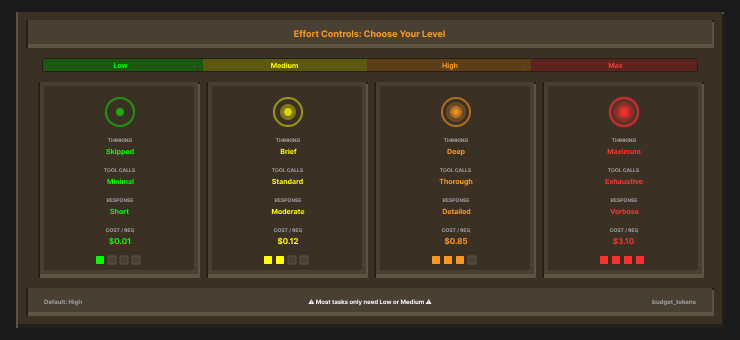
Low. Claude skips thinking on straightforward requests, makes fewer tool calls, and produces shorter responses. Use this when you already know what you want and Claude’s job is execution, not reasoning. Boilerplate generation, formatting, classification, simple transformations.
Medium. Claude thinks when the task warrants it but doesn’t go deep by default. Fewer tool calls than high, shorter reasoning chains. This is the level Anthropic recommends for “many routine tasks” on Opus 4.6. At medium effort, Opus 4.5 matched Sonnet 4.5’s best SWE-bench score while using 76% fewer output tokens. That’s the efficiency sweet spot for most coding work.
High (default). Claude thinks on most requests and reasons more carefully before responding. This is what you get if you don’t set the parameter at all. Good for complex tasks, but expensive on routine ones because thinking tokens bill at the output rate ($25/MTok on Opus 4.6).
Max (Opus 4.6 only). No constraints on thinking depth. Claude will use as much reasoning as it determines it needs, which can mean long chains of thought that approach the max_tokens budget. Reserve this for problems where you want Claude to exhaustively reason through every angle: security audits, root cause analysis, architectural decisions with competing tradeoffs.
How effort interacts with thinking
Effort controls work best when paired with adaptive thinking:
{
  "model": "claude-opus-4-6-20250613",
  "max_tokens": 16000,
  "thinking": {
    "type": "adaptive"
  },
  "output_config": {
    "effort": "medium"
  },
  "messages": [...]
}
Adaptive thinking is the recommended configuration for Opus 4.6. It replaces the older budget_tokens approach, which is deprecated on this model. Where budget_tokens gave you a fixed token ceiling for thinking, adaptive thinking lets the model decide how much to think based on the effort level and task complexity. The two work together: effort sets the intent, adaptive thinking handles the allocation.
One behavior that adaptive thinking enables automatically is interleaved thinking. Claude can think between tool calls, not just at the start of a response. In agentic workflows where Claude calls tools in sequence, this changes the execution pattern. Without interleaved thinking, Claude does all its reasoning upfront and then executes. With it, Claude can reason about each tool result before deciding what to do next. At lower effort levels, it skips this intermediate reasoning when the tool results are straightforward. At higher levels, it reasons after every step.
What effort affects
Effort doesn’t just control thinking tokens. It changes three things:
1. Thinking depth. How many tokens Claude spends on internal reasoning before producing a response
2. Tool call frequency. How many tools Claude invokes per request. Lower effort means fewer calls, which reduces both latency and cost.
3. Response length. Lower effort produces shorter, more direct text responses. Higher effort produces more detailed, considered responses.
A high-effort request with multiple tool calls and deep thinking can generate 5-10x the output tokens of the same request at low effort. That multiplier hits your bill at $25 per million output tokens on Opus 4.6.
One more thing: effort is promptable
You can also steer thinking frequency through your system prompt. If you tell Claude “think carefully about edge cases” in the system prompt, it will think more often even at medium effort. If you tell it “respond concisely without deliberation,” it will think less even at high effort. The effort parameter sets the baseline; the prompt can push it in either direction. This gives you two levers: the parameter for broad control, the prompt for task-specific tuning.
When to Use Each Level
Here’s what we know so far. Anthropic’s benchmark data shows that at medium effort, Opus 4.5 matched Sonnet 4.5’s best SWE-bench score while using 76% fewer output tokens. At the highest effort, it exceeded Sonnet 4.5 by 4.3 points while still using 48% fewer tokens.
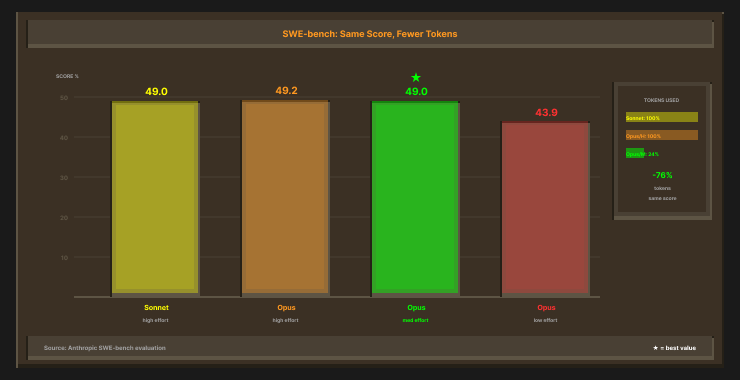
Here’s what we know so far. Anthropic’s benchmark data shows that at medium effort, Opus 4.5 matched Sonnet 4.5’s best SWE-bench score while using 76% fewer output tokens. At the highest effort, it exceeded Sonnet 4.5 by 4.3 points while still using 48% fewer tokens.
Early access partners reported similar results in production. GitHub’s Mario Rodriguez saw it “surpass internal coding benchmarks while cutting token usage in half”. JetBrains reported 50-75% reductions in tool calling errors and build/lint errors with their Junie agent. AJ Orbach at Text2SQL.ai called the effort parameter “brilliant,” noting that at lower effort the model “delivers the same quality we need while being dramatically more efficient” for SQL generation workflows.
That data is compelling but narrow. SWE-bench scores and SQL generation are specific use cases. What’s missing is systematic testing across the range of tasks engineers run every day: writing tests, debugging across multiple files, reviewing PRs, scaffolding new services, refactoring legacy code. Nobody’s published “I ran the same debugging task at low, medium, high, and max and measured quality, cost, and latency for each.” We’re running those experiments now and will publish the results in a follow-up post. If you’re testing effort levels in your workflows, we’d like to compare notes.
Until that data exists, here’s what we’re working with. It draws on Anthropic’s docs, the benchmark results, the partner reports, and our own experimentation.
Low effort: execution tasks
Use low when Claude’s job is to produce something you already know the shape of. You’re asking it to write a known pattern, not reason through a problem.
Tasks that fit: boilerplate generation, file scaffolding, import formatting, conventional commit messages, simple type annotations, lint-fix suggestions, renaming variables across a file, generating standard route handlers.
The common thread is that these tasks have a clear correct output. There’s no ambiguity about what “good” looks like. Claude doesn’t need to weigh tradeoffs or consider edge cases. Low effort skips thinking on these, produces shorter responses, and makes fewer tool calls. Thomas Wiegold frames it well: “Need a quick function signature? Low effort.”
Medium effort: standard implementation
Medium is the workhorse level. This is where most daily coding happens: implementing a CRUD endpoint, writing unit tests for an existing function, refactoring with a known pattern, reviewing straightforward PRs, writing documentation for existing code, adding error handling to a module.
These tasks need some reasoning but not deep analysis. Claude should think about how your conventions apply, check that the implementation is correct, and produce clean output. It shouldn’t spend tokens tracing edge cases or reconsidering architectural decisions. Medium gives you that balance.
Anthropic recommends medium for “many routine tasks” on Opus 4.6, and the SWE-bench data supports it. For most implementation work, medium delivers the same quality as high at a fraction of the token cost. If you’re only going to change one thing about how you use Opus 4.6, set effort to medium for your standard coding workflows.
High effort: complex reasoning
High is the default, and for good reason on hard problems. Debugging a race condition, refactoring a module that touches six files, writing tests for edge cases in auth flows, understanding how an unfamiliar dependency behaves under load, reviewing a PR that changes core business logic.
These tasks require Claude to hold multiple concerns in working memory, trace execution paths, consider failure modes, and reason about interactions between components. The extra thinking tokens are worth it because catching an issue here prevents hours of debugging later. High effort is where Opus 4.6 earns its pricing.
If you’re leaving high as your default for everything, you’re either rich or NGMI. If 60% of your API calls are medium-complexity tasks running at high effort, you’re overpaying on the majority of your workload.
Max effort: exhaustive analysis
Max is for problems where you want Claude to leave nothing on the table. Root cause analysis across a large codebase, security audits of authentication flows, designing system architecture from competing requirements, debugging production incidents with incomplete logs.
These are the tasks where a shallow answer is worse than no answer. You want Claude to consider every angle, second-guess its initial conclusions, and reason through implications. Max effort can produce long chains of thought that approach the max_tokens budget. The cost per request is high, but you’re using it on problems where the alternative is hours of senior engineer time.
Max is exclusive to Opus 4.6. If you’re not on Opus 4.6, high is your ceiling.
Cost math: why distribution is everything
One practitioner framework from Digital Applied suggests a 60/30/10 split: 60% of requests at medium, 30% at high, 10% at low. They report taking a client from $840/month to $320/month by shifting requests from blanket-high to this distribution.
That’s one data point, not a proven formula, but the principle is sound. Most API spend on Opus 4.6 comes from thinking tokens on requests that didn’t need deep reasoning. Shifting your default from high to medium and reserving high/max for tasks that warrant it is the highest-leverage change you can make.
The Multi-Model Angle
Effort controls give you one axis of optimization: how hard a single model thinks. The second axis is which model you use in the first place.
Anthropic’s current lineup spans a wide cost range:
Haiku 4.5: $1/$5 per MTok (input/output)
Sonnet 4.5: $3/$15 per MTok
Opus 4.6: $5/$25 per MTok
Haiku 4.5 delivers roughly 90% of Sonnet 4.5’s agentic coding performance at one-third the cost, based on Augment’s evaluation. That means a formatting task running on Opus 4.6 at high effort versus Haiku 4.5 at low effort isn’t a small difference. It’s an order of magnitude.
Practitioners figured this out before Anthropic shipped the tooling for it. Simon Willison ran a major refactor of sqlite-utils with Opus, covering 20 commits, 39 files, and 3,000+ lines changed. Partway through, he switched to Sonnet and “kept on working at the same pace”. The gap between the models showed on ambiguous architectural decisions, not on well-scoped implementation. Ayaan Haider tested all three models across Flutter projects and landed on a simple split: “Haiku for setup, Sonnet for builds, Opus for reviews. That combo just works”. He found Opus caught async bugs and rebuild issues the other models missed entirely, but for routine builds it was overkill.
The pattern keeps showing up. An open-source tool called claude-router routes requests to Haiku, Sonnet, or Opus based on complexity and reports ~40% cost savings. The Clawdbot optimization guide describes workflows where a main agent spawns sub-agents on cheaper models for background tasks, reporting 60%+ cost reductions. Anthropic themselves built this pattern into Claude Code: opusplan mode uses Opus for planning and auto-switches to Sonnet for execution.
Use the expensive model for the hard thinking and cheaper models for everything else. The community has been doing this by hand: switching models mid-session, building routing layers, running different models in different terminals.
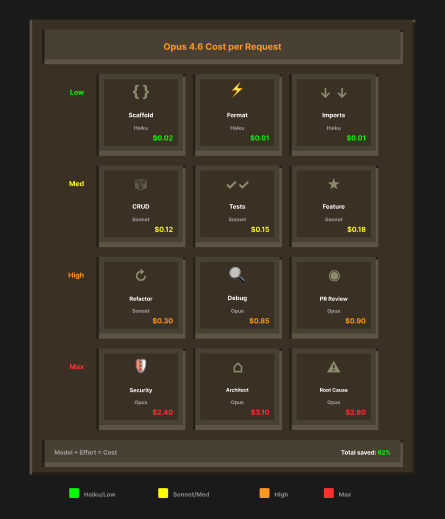
But here’s where the two axes meet. Model selection tells you which brain to use. Effort controls tell you how hard that brain should think. Combined, you get a matrix:
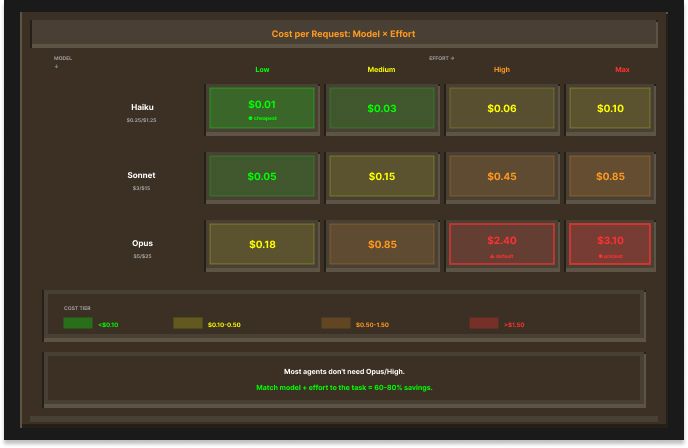
Nobody’s running every row at Opus/high, but in practice most developers are still using one model at one effort level per session. Claude Code lets you pick a model and set an effort level, but it applies to the whole session. You can’t say “use Opus at max for this planning step, then switch to Sonnet at medium for implementation, then Haiku at low for cleanup.” Not without manually switching between commands.
The primitives exist, but the per-task orchestration doesn’t. Not yet.
Where This Goes: Effort as a Workflow Primitive
If you’re running single-agent sessions in Claude Code, effort controls save you money today. Set your default to medium, bump to high when you’re debugging something hard, and you’ll see the difference on your next invoice. That saves money with zero tooling changes.
If you’re looking to save even more using multi-agent workflows, we recommend per-agent configuration, tuning the model and effort level for each step in a workflow independently. A planning step needs Opus at max effort, an implementation step needs Sonnet at medium, and a formatting step needs Haiku at low. Running every step at Opus/high means paying $25/MTok output on a formatting pass that Haiku could handle at $5/MTok with low effort. Per-agent tuning lets you put your budget where it earns a return and cut it everywhere else.
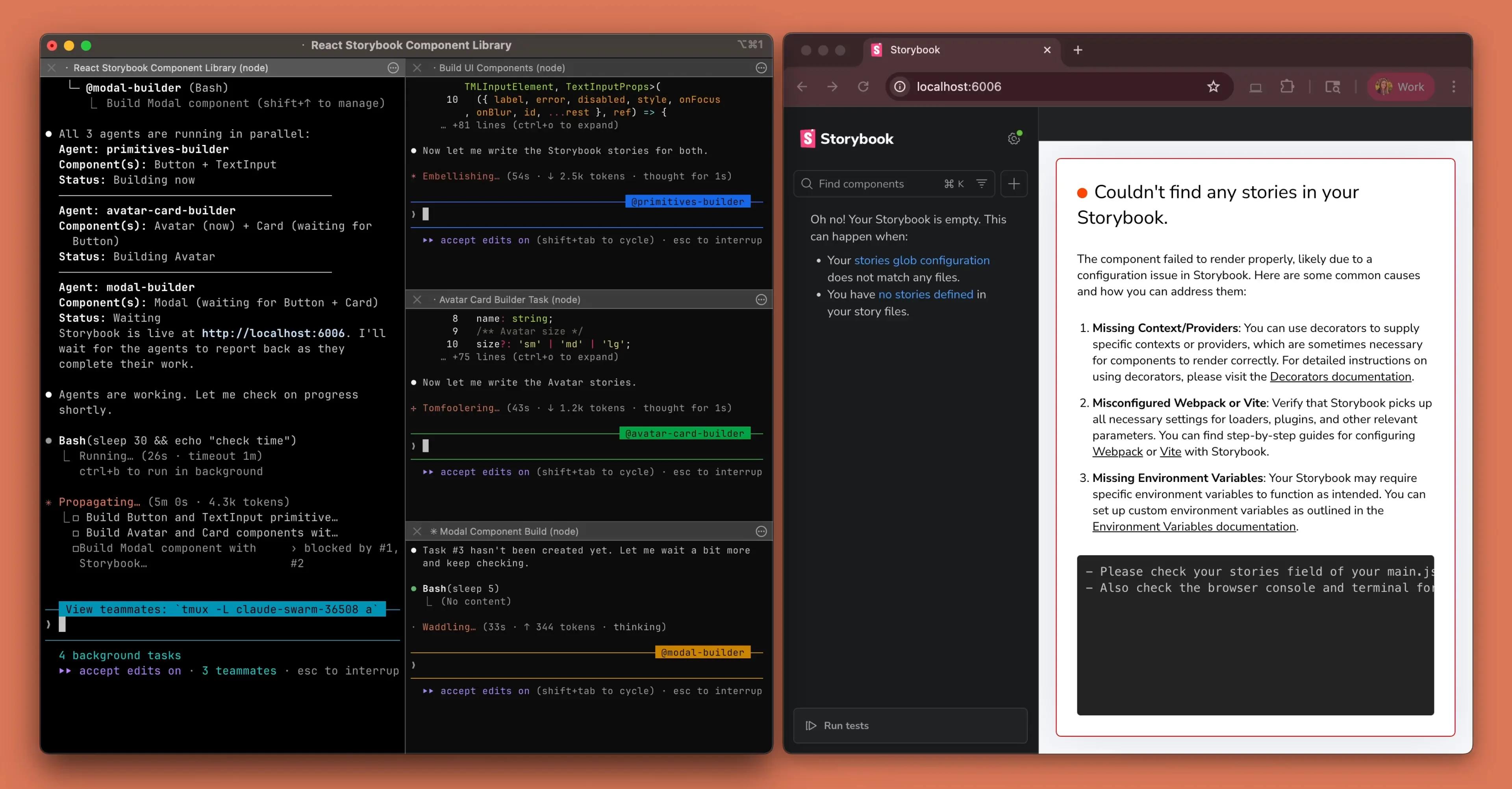
Claude Code doesn’t support this yet. You pick one model and one effort level, and it applies to the whole session. If you want to change the configuration between steps, you switch manually. That works for two or three steps but breaks down when you’re running a six-step bug reproduction workflow or kicking off three workflows in parallel.
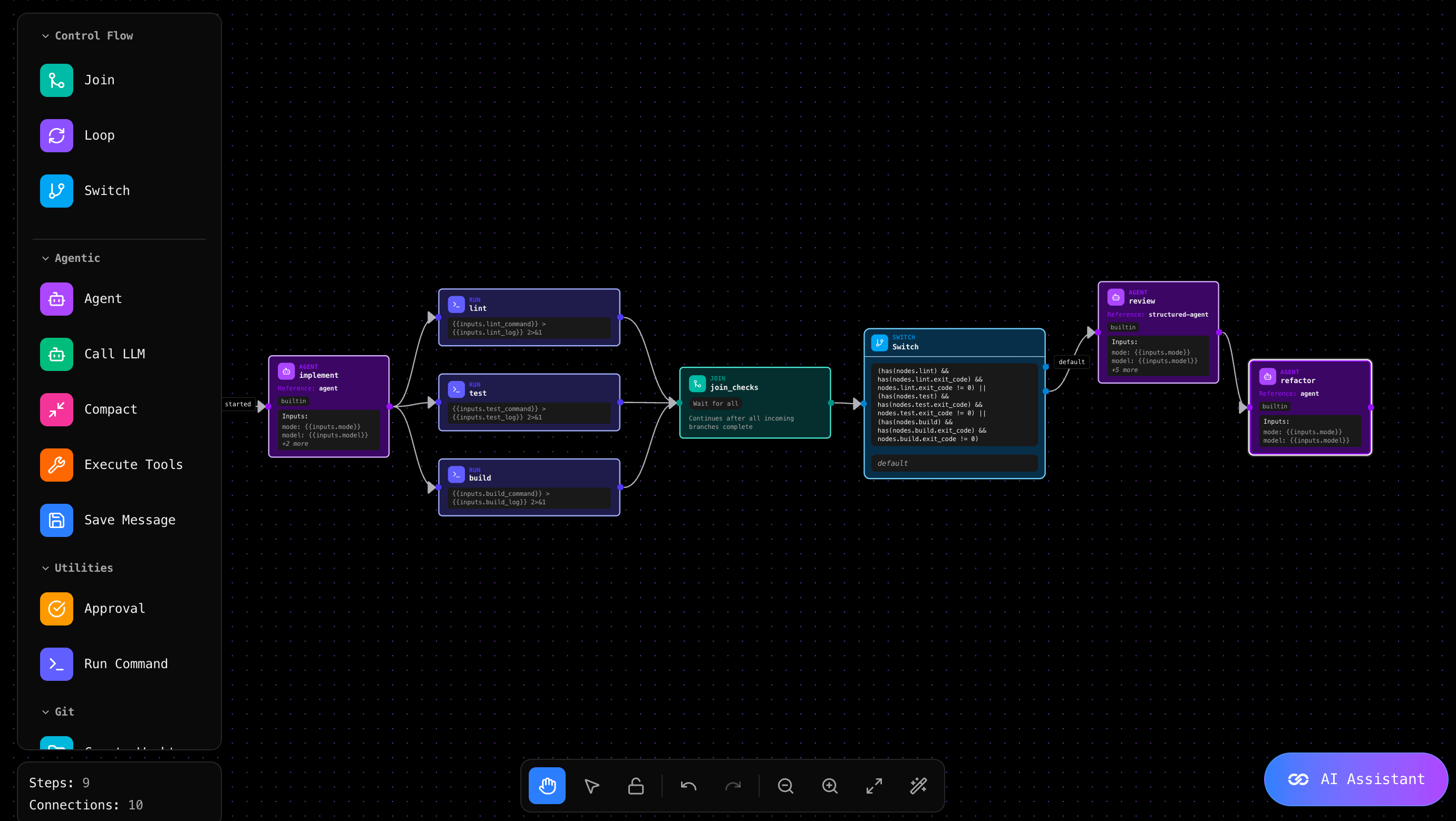
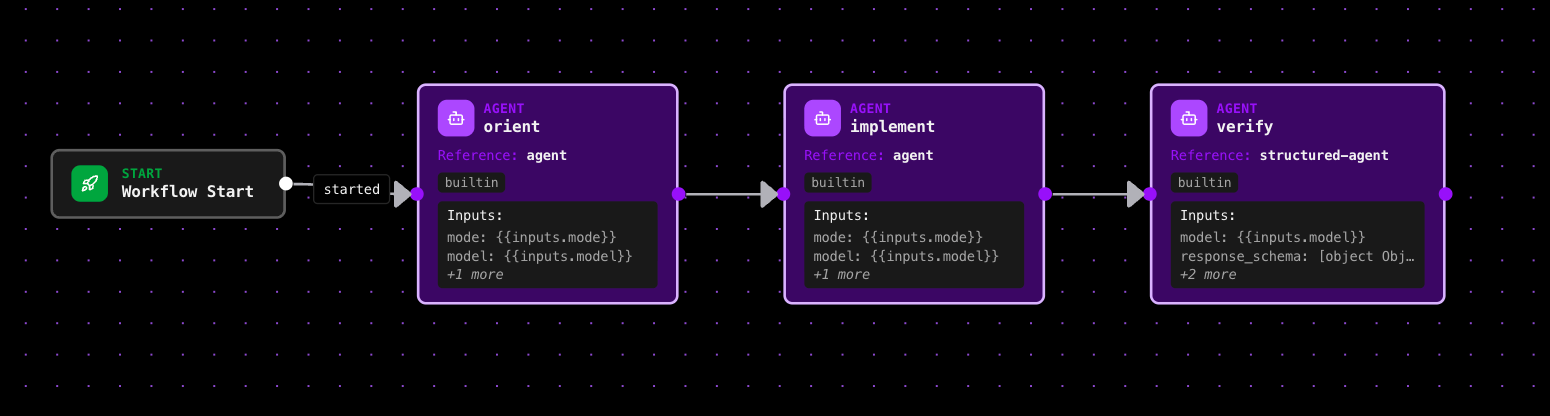
This is what we’re building at Reliant. In Reliant’s workflow builder, each agent in a workflow gets its own model and effort level:
Planning Agent → Opus 4.6, max effort
Implementation Agent → Sonnet 4.5, medium effort
Test Agent → Sonnet 4.5, high effort
Review Agent → Opus 4.6, high effort
Formatting Agent → Haiku 4.5, low effort
The workflow runs sequentially. Planning completes, implementation starts, tests run, review checks the output, formatting cleans it up. Each agent uses the configuration tuned to its role. You set it up once in the visual builder and run it on every bug, every feature, every refactor.
The matrix from the previous section is the mental model, and Reliant is where you implement it.
Try Reliant
Agents that implement, verify and review in a loop until the work is done.