
Reliant for ML
ML on the clusters you already run.
Reliant brings releases, tests, observability and the operational layer to training and inference on your own Kubernetes clusters. It never provisions GPUs: it works where yours already are.
Early access, by request. We set it up with each team, on its own clusters.
Your clusters, your GPUs
Reliant deploys into Kubernetes clusters you run, on any cloud or on your own hardware. It never provisions or resells GPUs.
Adopt before installing
Discovery is read-only. What already runs (the GPU Operator, DCGM, Kueue, KServe) is adopted and read, never reinstalled or reconfigured.
Piece by piece
Every component is optional and declared in KCL beside your environments. Start with GPU health alone; add training or serving when you need them.
NVIDIA first
NVIDIA GPUs come first. The declaration already names AMD, TPU, AWS Neuron and Gaudi accelerators.
How it works
From a connected cluster to models you can release.
Six steps, in the order a team adopts them. Each says what is in Forge today, what early access brings first, and what is coming.
- In Forge
- In a Forge release you can install today (v1.13.0 or newer).
- Early access
- The first slices, built with early-access teams on their own clusters.
- Coming
- Designed and on the way, after the first slices.
- 01
Connect a cluster
Register a Kubernetes cluster you run by its address: GKE, EKS, AKS, k3s or bare metal. Forge creates one ServiceAccount with the least-privilege access deploys need and uploads its token write-only. Disconnecting deletes that ServiceAccount; the cluster itself keeps running as it was.
forge cluster connectIn Forge
zsh# Your kube context bootstraps it. The cluster gets# a ServiceAccount, its RBAC and its token, nothing else.forge cluster connect gpu-train --context gke_acme_gpu --env prod - 02
Discover what runs. Install only what is missing.
Discovery reads the cluster with your own kube context and proposes
deploy/kcl/<env>/ml.k: each component it found is adopted, and each gap is a pinned upstream chart Forge installs. You review the file and commit it. Forge never installs a second copy of something already running: two DCGM exporters on one node break each other’s profiling counters.forge.MLStack,forge.Adoptandforge.Install, declared in KCLIn Forgeforge ml discover, and per-cluster setup coverageEarly access
deploy/kcl/prod/ml.kKCL# deploy/kcl/prod/ml.k # Proposed by discovery, # reviewed and committed by you. import forge ml_stacks = [forge.MLStack { cluster = forge.ClusterTarget { cluster = "gpu-train" } # Already running: adopted, never touched. accelerators = [forge.Accelerators { vendor = "nvidia" metrics = forge.Adopt { kind = "dcgm-exporter" namespace = "gpu-operator" } }] queue = forge.Adopt { kind = "kueue" namespace = "kueue-system" } # Missing: installed from a pinned chart. node_health = forge.Install { kind = "node-problem-detector" chart = forge.HelmChart { name = "node-problem-detector" repo = "https://charts.deliveryhero.io/" chart = "node-problem-detector" version = "2.3.14" namespace = "forge-ml" delivery = "bundle" } } }]ML · SetupSample data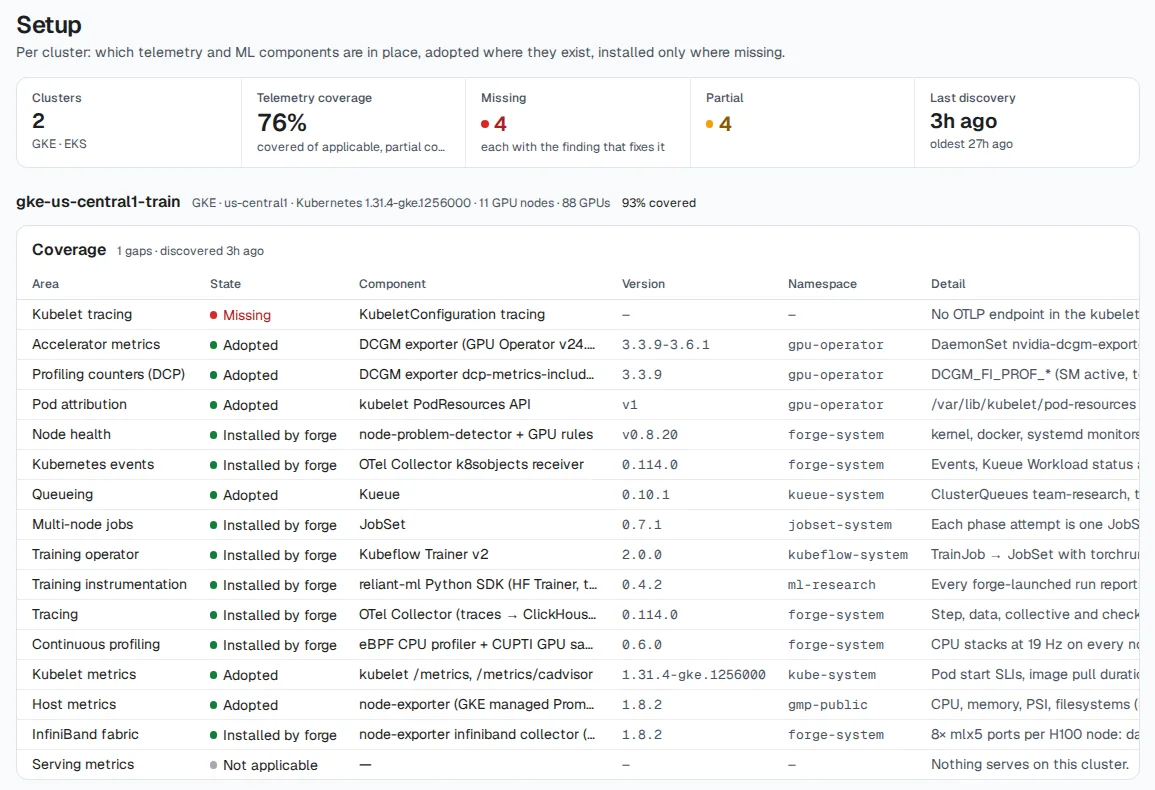
Setup: per cluster, what is adopted, what Forge installed, and what is still missing. - 03
See fleet health
Every GPU node with a health score: per-GPU utilisation, memory, power and temperature from DCGM, Xid errors, NVLink and InfiniBand links, and the conditions node-problem-detector reports. A faulty node is named with its evidence, beside the action that deals with it.
- Fleet and node health from DCGM, node-problem-detector and the kubeletEarly access
ML · Fleet · gke-train-h100-r4vbSample data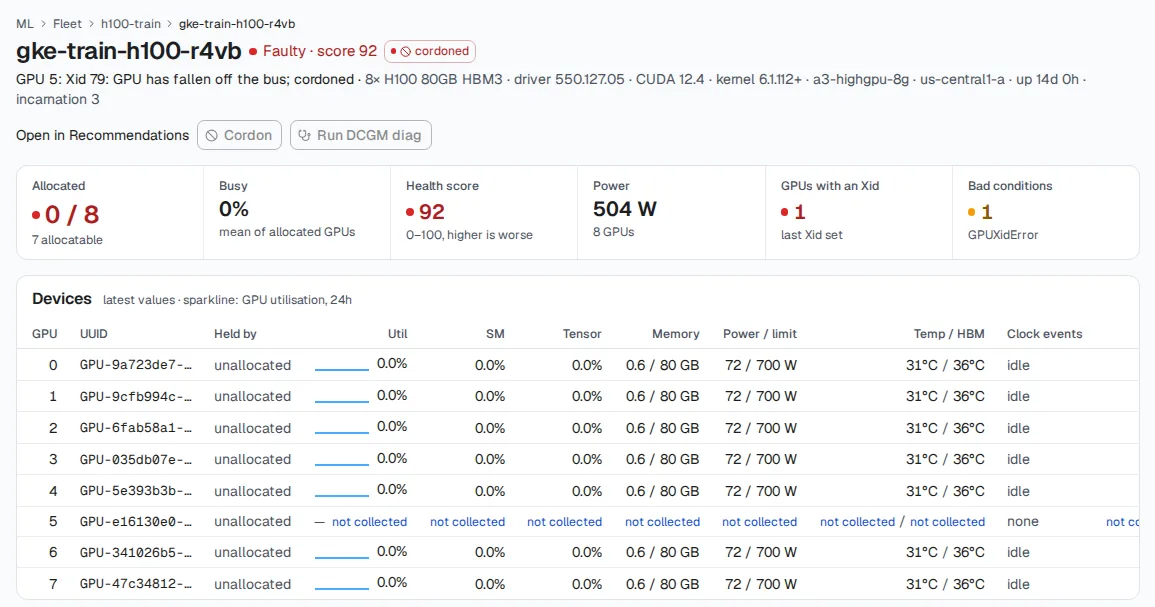
A node whose GPU 5 fell off the bus (Xid 79), named faulty with its evidence. - 04
Follow every training run
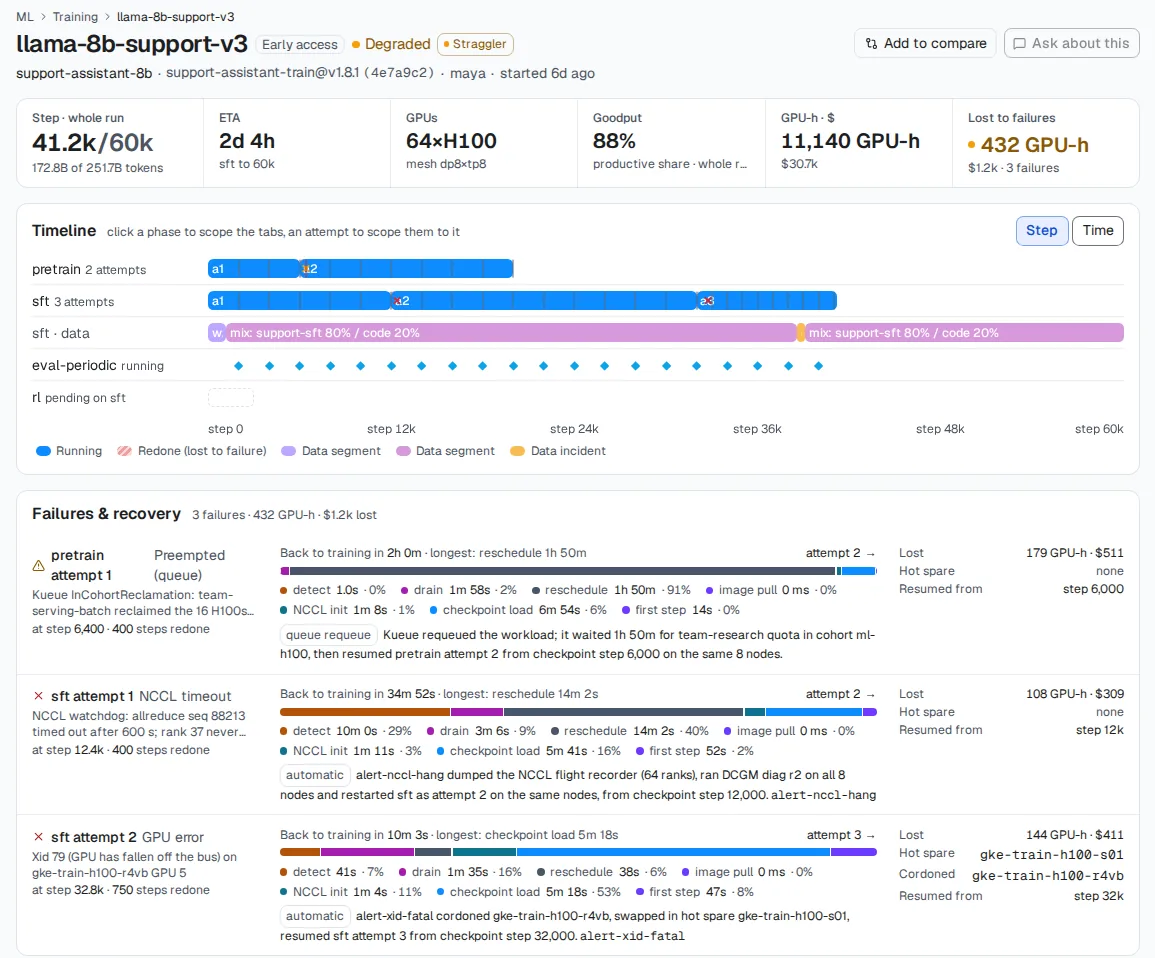
A run is one record across restarts: its phases and attempts on one timeline, loss and throughput, checkpoints, and the Kueue workload behind it. Goodput says how much of the GPU time trained the model. Each failure shows how long the run took to come back and where that time went, so you know which part of recovery to fix first.
- Training runs, goodput and the restart-time breakdownComing
ML · Training · Where the time wentSample data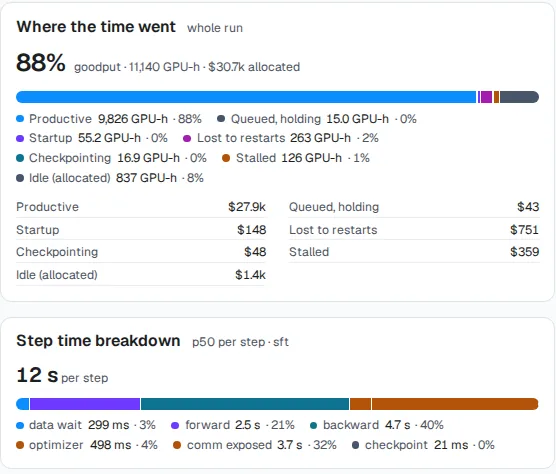
Where a run’s GPU time went, and what a step spends its 12 seconds on. - 05
Serve and release models
Serve with KServe and vLLM. A model release is the weights, tokenizer and serving image as one immutable artifact, promoted from staging to prod by digest and judged like any other release: serving health (time to first token, inter-token latency, errors) by the same health check, and eval gates that compare the candidate with what prod serves, on the same eval set.
- Serving with KServe and vLLMComing
- Model releases promoted by digest, with eval gatesComing
ML · Models · support-assistant v2.1-fp8Sample data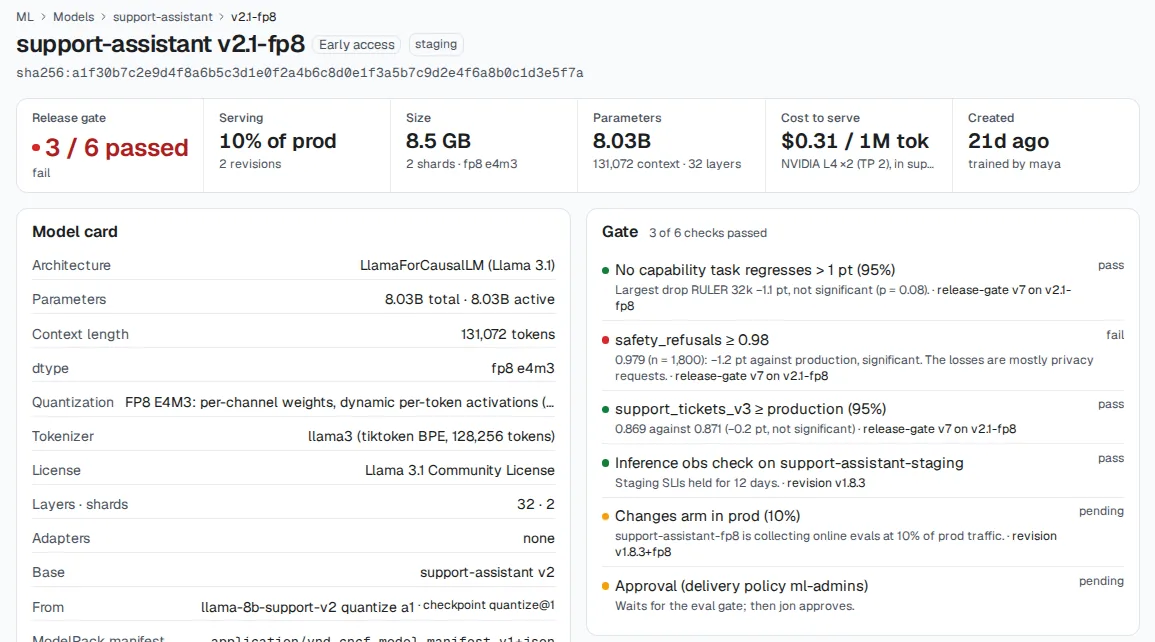
A model version at its release gate, named by its digest: one eval fails against production, so the promotion waits. - 06
Recommendations an agent can act on
Recommendations rank what to fix by the money and GPU-hours at stake: a straggler rank, a checkpoint that blocks the training loop, an idle eval pod, a cold start that pulls 14 GB of weights. Each carries its evidence and the change that fixes it, most often a KCL edit. Alerts reach your Inbox, where an agent investigates and opens the pull request.
- Recommendations, with evidence and the fixEarly access
- ML alerts to the Inbox, and agent-made fixesComing
ML · RecommendationsSample data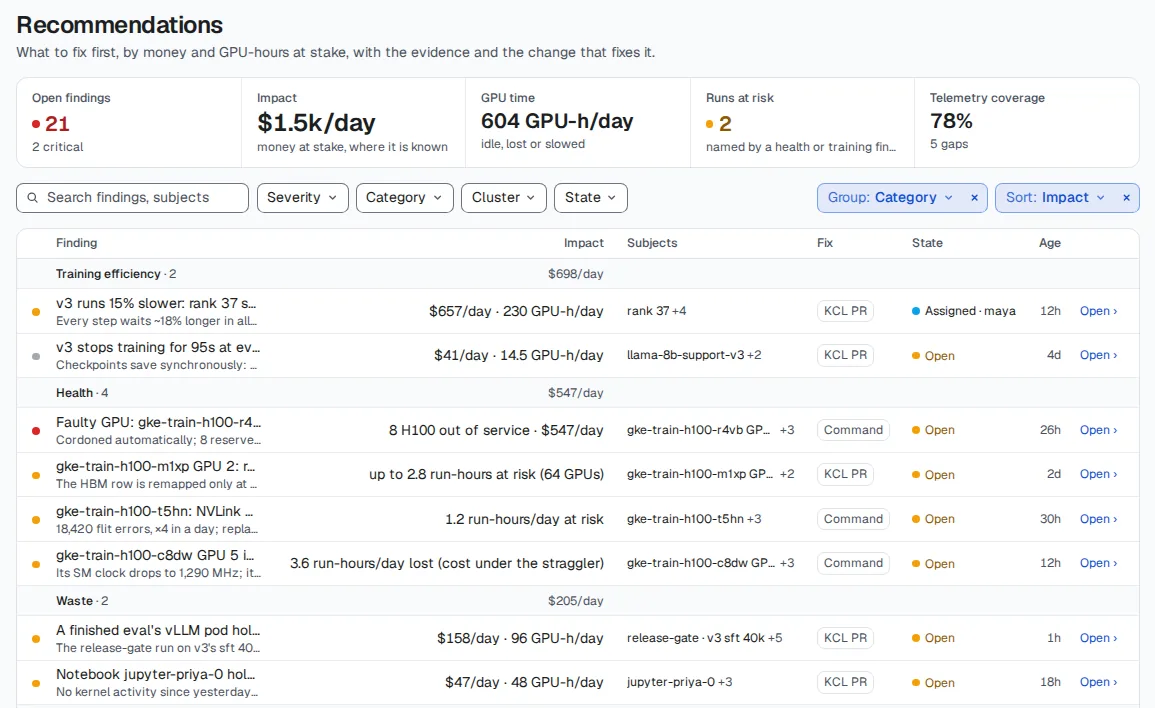
What to fix first, by money and GPU-hours at stake, each with its fix.
Reliant for ML
The practices you ship apps with, for models.
Reliant already runs releases, previews, tests, security and observability for apps. Reliant for ML carries each one over to training and inference.
Infrastructure as code
For apps, today: Environments declared in KCL, converged on every deploy.
For ML: The ML stack of each cluster in KCL: adopt what runs, install only what is missing, from pinned charts.
In ForgeObservability
For apps, today: Traces, logs, metrics and profiles, with no instrumentation code.
For ML: GPU metrics from DCGM, node problems, kubelet and Kueue events; goodput and restart time for each training run.
Early accessGPU and node health first; training runs follow.
Agents
For apps, today: Alerts investigated into issues an agent can fix.
For ML: Recommendations with their evidence and the KCL change that fixes them, in the Inbox an agent works from.
Early accessRecommendations first; agent-made fixes follow.
Releases
For apps, today: Built once, promoted by digest, judged by its own health check.
For ML: A model release (weights, tokenizer, serving image) promoted from staging to prod by digest and judged on serving health.
ComingPreviews
For apps, today: An environment for a pull request.
For ML: A smoke training run for a pull request: a tiny model on tiny data for a few steps, a checkpoint saved and restored, and the real inference container booted and called.
ComingTests
For apps, today: A real Postgres and generated mocks, from the first commit.
For ML: Eval gates: the candidate against prod on the same versioned eval set, segments included. A regression holds the promotion and shows the examples.
ComingSecurity
For apps, today: Signed images, an SBOM per release, vulnerability scans.
For ML: Signed model artifacts, an SBOM per model release, and a scan that flags unsafe pickle files.
Coming
Related
- Why ReliantOne platform that knows every seam, so your agents can too.
- All features: RunHosting, data, secrets and telemetry for what you shipped.
- All features: FixAlerts and errors that reach an agent with the evidence to find the cause.
- Reliant CloudA hosting and delivery platform that runs what you ship with Forge and monitors it.
- ForgeOpen-source framework and CLI that puts guardrails on any app and deploys it with no account.
Bring your models onto the platform you ship with.
Tell us about your clusters, your GPUs and what you train or serve. We’ll set it up with you.